Table of Contents
Welcome to the devlog (“developer’s diary”) for the educational puzzle game Critter Chess. In this article I briefly explain the process behind the game’s development, any problems faced, and any interesting lessons learned!
What’s the idea?
As the name implies, it’s a puzzle about moving pieces (animal pawns) where every piece moves in its own unique way.
The movement is based on Chess, but simplified. One animal can only move to the left, one can only move down, and so forth. It’s an educational game meant to teach the different directions, their names, and how they combine into more complicated paths and movements (on higher difficulties).
Your goal is simply to get all animals to their home square.
That’s it!
Funnily enough, this was the very first idea I had for puzzle games about directions / spatial awareness … and also the last one I actually made.
I made Pinstrike first because it was a very unique idea which automatically means I’m more “interested” in it. Then I made Direction Digger, which was also interesting to me because it had new ideas and challenges.
And I was right about that, because Direction Digger was such a difficult game to code that it forced me to rethink my entire puzzle game framework ;) It took almost three times as long to finish that game than any of the other puzzle games. It almost made me take a break because I was a bit fed up with writing all that code for movement-based puzzle games.
But in the end, as always, taking on big challenges also teaches you big lessons. When I finished that game, I had already figured out all the tools I’d need for Critter Chess. My puzzle framework (or “code library”) had all these functions for creating a grid, for checking the neighbors of a square, built-in support for checking if a move is valid or not, etcetera. A large part of this game was basically already done (“for free”), which means it felt silly to not make it now.
How to generate puzzles?
One reason I liked this idea, and wrote it down as the “simplest” of them all, is because puzzle generation is straightforward.
- We start with an empty map.
- We place some pieces at random spaces => save these locations as their home.
- Now, we take random moves, as often as we like / want!
- Pick a random piece, get a list of all squares it can move to, pick a random one.
- When we’re done, pieces will have wandered away from their home and ended at some other random location.
Now we have a puzzle to solve. And the list of random moves we made, once reversed, is the solution! We’re done!
This is considerably simpler than many of the other algorithms I described in other devlogs. (Especially the ones in Direction Digger and Pinstrike …)
There are, of course, some implementation details.
- Pieces can’t be in the same space. So don’t allow any movement into an occupied square.
- It’s a bit silly for pieces to shuffle back and forth, or not get far away from their home. So forbid going back to where you came from, and check (once done) if all animals have moved often enough.
- In fact, to help make the puzzle as hard as possible, prefer moving into spaces where other pieces were before. And prefer moving longer distances.
- In practice, this means we sort our list of all possible moves based on these metrics, and then pick one of the first 3 to 5 possible moves each time.
How do animals move?
Troubles & Tweaks
Like with most of my projects, the goal is to simplify existing ideas (such as Chess) further, to make it accessible to young kids and to ease them into learning as they go.
That’s why the critters in my game don’t move like Chess pieces, at least not at first. From years of making video games and board games, I’ve learned to make that first introduction to a game absolutely as simple as possible. You might think something is simple enough (“this piece moves as far as it can go on a diagonal! Simple!”), but new and inexperienced players will disagree (“What’s diagonal again? Do other pieces block it? Or does it jump over them? Can it go in BOTH diagonals?”).
After some thought, I realized we have two choices. Two absolute simplest rulesets that still create actual puzzles.
- The basic animals just move in one direction, as far as they can go.
- The basic animals move in two opposite directions (e.g. LEFT and RIGHT), but only one step.
If the animals can only move in one direction, and only by one step, then it’s not a puzzle anymore. You just … take the only step you can take … repeat until solved. It’s a rote exercise, not a puzzle.
On harder difficulties, pieces should absolutely move “as far as they can”. This just provides way more options and interesting solutions. It’s the logical “next step” for each animal’s movement.
But now we get a second problem: it’s confusing if a Fox only moves one step at the Easy difficulty, then suddenly moves as far as you want at the Medium difficulty. It’s even more confusing if the “old animals” (that you already learned before) move as far as they want, but the “new animal” (from this difficulty level) only takes one step.
It’s an inconsistency in rules that I don’t like. Subconsciously or not, it’s seemingly tiny things like this that trip people up the most.
At the same time, it’s just as weird to keep introducing new animals all the time, discarding the old ones completely.
Taking a step back
This seemed a tough problem to crack, until I took a step back and asked myself another important question: How exactly do players interact with the game?
In games like this, the interface / controls are almost always like this,
Click an animal -> it lights up and shows its possible moves -> click one of those squares -> the animal moves there
But one of the secret rules (for these puzzle games aimed at the youngest among us) is that I want all interaction to be a single thing. Each move = a single click. Each turn = a single tap, a single action. Not two of them in sequence. This simply allows more kids to understand and play immediately.
Fortunately, I already solved this issue with earlier games. We simply make the game tell you which animal to move now.
- There’s a list of animals at the top of the screen —> that’s the order in which you have to move them.
- Each turn, the next one lights up, and all the player does is tap where they go. Single tap!
Now we can solve all our problems in one fell swoop.
- At the Easiest difficulty, the game selects which animal you move on each turn.
- This automatically makes it a puzzle. Maybe the obvious solution would’ve been to move the Fox first … but the game wants you to move the Mouse on turn 1.
- And this allows all animals to move one step, in one direction. The simplest possible way! But it’s still a puzzle now!
- At a later difficulty, we can make a general rule change and say: “From now on, all animals move as far as they can go.” (Instead of modifying individual animals or introducing new ones all the time. Such a clear, one-time, global rule update is always much more obvious to players.)
- (Similarly, at later difficulties, the game “opens up” and I actually make the player pick the animal themselves and perform two clicks.)
Implementing this
I really wanted to focus on clean code with this project. This section is slightly technical, so you can skip it if you want, though I made it as easy to understand as possible.
So, how do we implement the different animals?
- Each animal extends some
AnimalDataclass. That class contains some basic properties all of them have to set. Such asimagethat tells the system what image to display for this animal, ornamethat contains the unique name for the animal.- I use the Godot Game Engine. It allows turning such a script into a resource, and then allow you to set its data from within the editor. Once done, I can throw that resource into any other script, and it will have all the right data about this animal and how it moves!
- (You can view Resources as the definitive books written on specific subjects. The
AnimalDataBunnybook knows eeeeeverything about the bunny pawn. All other code in the game can just grab that single book and read it if they need to. No other part of the code has to know anything about bunnies and their movement at all—it’s all in that single book.)
- The most important property is
movement. This wants any resource that extends theMovementDataclass. - The
MovementDataclass has required functions likeget_all_possible_moves()andmove_to(new_location)that are called by the system.- Crucially, the system does not need to know anything about the animal it’s moving. It knows nothing, except that those functions exist and that it can call them.
- The
MovementDatascript itself contains the custom code that makes each animal move in its unique way. - For example,
move_to()for the animal that moves to the LEFT would simply contain a bit of code that says “grab the cell to our left, then place this piece there”.
In practice, this means we get a nice self-contained Resource for every animal. If I want to work on a specific animal or movement type, perhaps find an error in it, I know exactly the 20 lines of code I need to be and nowhere else. The code for moving any of them is only a few lines of grabbing the right resource (for the animal) and calling the right function on them. (that I am certain exists).
Making it look good
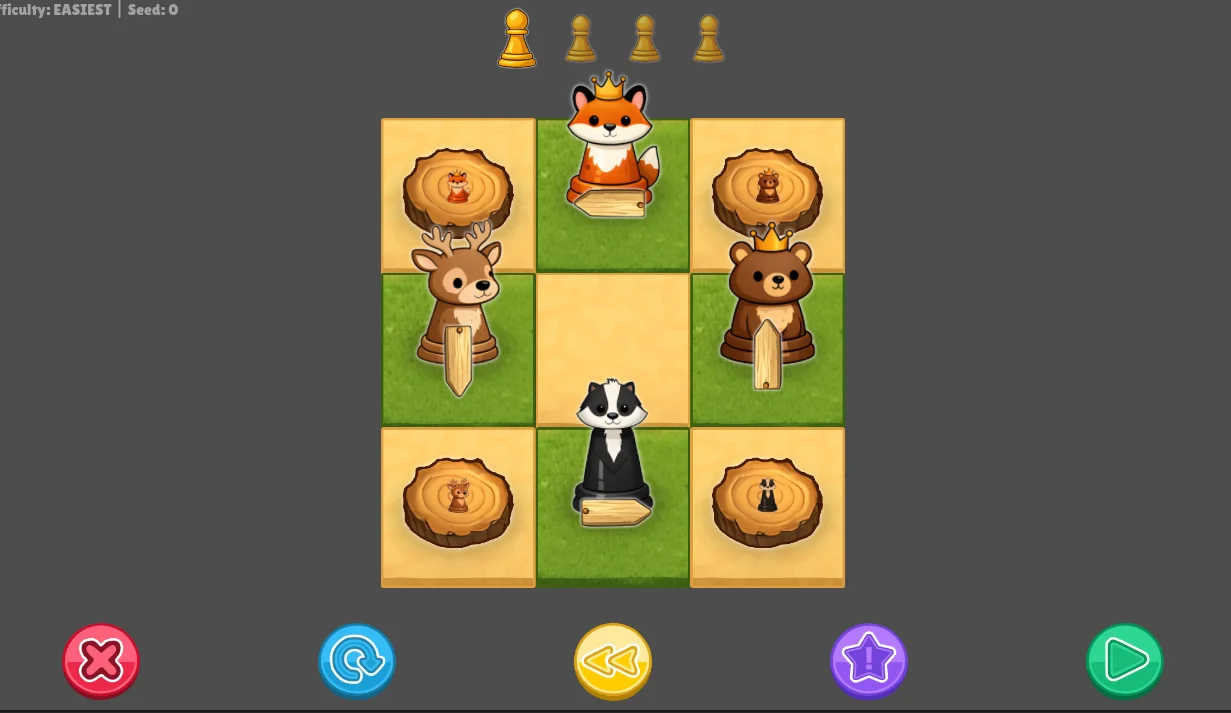
When you have such a specific vision or theme, and you explain it reasonably well, then AI image generators will know what to do. All the pawns in the game were the result of the very first try. I cut them out, cleaned up some mistakes or inconsistencies, and turned that into a spritesheet of all possible animals in the game.
Then I created two tiles to make up the checkerboard pattern (“white” and “black”). Sticking to the organic and cozy style, I made them a beige sandy tile and a green-yellowish grass tile.
It was a bit overbearing to create an actual house or tree for the “home” of creatures. (Far too large, too detailed, obscures part of the board behind it, does not fit the rest of the look, etcetera.) So, instead, I ended up creating a tree stump as the target. It fits the theme, it’s “logical” to have a tree stump on grass/dirt, and it’s a nice circle that allows placing an image of a pawn inside. (So you know whose home it is.)
Finally, I created some generic wooden arrows, panels, stars, etcetera. I did not have a clear purpose for them yet, but I knew I’d probably want stuff like that in the long run. A game about directions will probably display arrows at some point, so better to just make them now.
Putting it all together, we get something like this.
The “Fail Faster” Principle At Work
So, I made all this. Finished the algorithm, finished the visualization to check if it worked correctly, and made the game playable.
And … just seeing it in front of me for the first time, playing one puzzle, immediately revealed some practical issues.
- The game highlights your possible moves. But … if pieces only move 1 step in 1 direction (at Easiest difficulty), this means the game is literally telling you what to do, 100% of the time. Duh! Not a game or puzzle at all!
- Similarly, starting with only GO-LEFT and GO-RIGHT pieces makes the puzzles even more boring and obvious. You just walk in a straight line to your home. Without the ability to go backward, for example, puzzles can’t really happen.
- It’s messy to let animals start on the homes of other animals. But if we don’t, then the map quickly fills up with all those home squares—maybe not ALL animals need to have a home? Only some? (Additionally, it’s a bit annoying now to have multiple animals of the same type, because their homes look the same and puzzles can be way too easy if they just visit each other’s home.)
- As explained, at the Easiest difficulty, the game selects the animal for you, and you only have to tell it where to move. There are many situations, though, where you might move animals in such a way … that they are already home/gone, when the game still wants you to move them again! This means it can’t find the piece it was supposed to select and the whole thing breaks.
Even though I’m quite fast already, I keep thinking I should probably get a working prototype even faster. Because I still end up thinking too much beforehand and only realizing major mistakes with my thinking after hours of coding :p
Anyway, let’s see if we can solve these issues.
Problem #1: I decided to make highlighting moves a setting. It’s turned off by default. In any other game this would be a no-go; it would just frustrate players through lack of feedback or interface quality. But this is a puzzle game specifically about directions and simple enough to do this.
The whole point is to practice and teach the directions, and if we allow players to just “brainlessly” click the one square highlighted for them we are not achieving this goal.Luckily, because I build it already, and it’s a setting you can easily toggle, you can turn it on at harder difficulties when you really want it.
Problem #2: I just don’t see a way to make actual puzzles with only a GO-LEFT critter and a GO-RIGHT critter. I wanted to split LEFT/RIGHT and UP/DOWN across difficulty levels, but that’s just too impractical. As such, on Easiest difficulty, you have 4 animals (left, right, up, down). They each take 1 step. Now, animals moving down can block animals moving left (for example), such that order of movement actually matters.
It’s unwieldy to explain all this however (“the fox takes one step to the left, the owl takes one step to the right, and so forth bla bla”). I decided to simply show its direction on the pawn with that wooden arrow I already made.
Problem #3: I had to switch my code around to simply allow some animals to not have a home. You “win” if all homes that do exist have the right animal on them. (Instead of checking the reverse: all animals are on a home.)
I like this change a lot because it simplifies the board, while making puzzles actually slightly harder/more intelligent. There are fewer homes on the board, fewer things to understand. But many solutions require moving an animal (without home) out of the way several times.
Additionally, I coded the option to REMOVE homes upon visit. In other words, if the Fox visits the Fox target/home, then both fox and home disappear. This is actually a great strategic addition in later puzzles as part of the solution might require making a certain animal get home before another. But as always, it’s optional, and I can turn it off if it turns out bad.
Problem #4: This required saving the piece moved on each turn (instead of just cell from and cell to). Now, when it loads the next turn, it just finds wherever that piece has ended up thanks to the player.
What if it does not exist anymore? (That REMOVE option is turned on and the player already brought it home?)
Then we have no choice but to FAIL the puzzle. Instant game over. Because it’s impossible to continue. (Of course, you can just undo from there and try again, failing simply means that it shows the game over screen and does not allow continuing.)
Similarly, what if the selected piece can’t move? Also an instant FAIL. Only if the player can pick which piece to move, or moves are highlighted (so you can see something has no moves), can we allow the game to continue normally. But without that feedback and choice, running out of moves at all obviously means you can’t be allowed to keep moving.
This is definitely the first time I’ve made a puzzle in which “go to game over” depends on which settings are turned on. But it just made the most sense for this one, and it works fine.
This left a final problem to address, though. Is it actually a good idea to keep this system of “the game tells you to move the FOX now” at the easy difficulties? Does this simplification (one player tap instead of two) really warrant making puzzles that much less … interesting? Is it actually a simplification, or will players feel annoyed/confused because they don’t select the piece to move themselves?
After some more experimentation and puzzle generation, I decided: yes, I should keep it, but you can turn it off in the settings. It’s not something that’s hardcoded behind the scenes, something that always exists on the easy difficulties and never exists on the harder ones. You can turn it on (or rather keep it enabled) if you like it or it makes sense for the player.
The more of the tiny Easiest puzzles I played, the more I realized that this mechanic is the only thing making it an actual puzzle at that point. The only times something interesting happens—something new that forces players to try another strategy and grow/learn—was because you have to move the animals in the order it says. It illustrates the types of spatial problems that will occur later. It streamlines the game (at this stage) to just a test of “Do you know what LEFT means?” because you have to click to the left of the right animal.
Earlier on, I mentioned how I wanted the switch from “all animals move only one step” to “all animals move as far as they can” to be a global rules switch. You start a new difficulty, and that’s the one new thing introduced. I realized I could do the same for other major rules updates!
- Easiest difficulty = one step at a time (left/right/up/down)
- Easy difficulty = move as far as you can go
- Medium difficulty = move backwards too
- Hard difficulty = allow jumping over stuff and _diagonals
- (All these animals are birds for obvious reasons.)
- Hardest difficulty = adds the famous KNIGHT and its weird movement
- In fact, we can add a variety of animals with wonky movement patterns you need to figure out yourself.
- I realized this is actually a fun puzzle to play too. I have this clean code pattern now that allows me to easily code any type of movement. So why not create a handful of pieces that do something weird with directions, and let kids/players test it and figure out how they move?
- But as always, it’s not for everyone, so this is a setting to turn on.
Does That Work?
Yes and no. The game works now (functionally), from start to finish, with a nice difficulty curve and variety of pieces. After tweaking the generation numbers (e.g. size of board, number of pieces depending on board size, etcetera) for a bit, I was able to consistently get puzzles where animals block each other at least a few times and it feels like a fine puzzle.
But the higher difficulties retain the problem of “animals make random moves before finally going home”. That’s the unfortunate side effect of this puzzle where the only objective is to get animals home—and it doesn’t matter how you get there. It doesn’t matter if the generation algorithm made the Fox move to 5 other spaces first before going home. A player will see the fox can go home in just one move and wonder why they had so many turns for this obvious puzzle :p
There are two solutions to this,
- Write some really clever twists into the algorithm to detect useless detours and cut them / prevent them.
- Turn this bug into a feature by placing stuff to visit/collect along the way.
As expected, we’re going to do the second thing because it’s less work and more interesting :p We’re basically going to pretend those detours actually have a function.
Almost by default, without thinking, I placed generic “stars” on spaces that were visited (but not a final home). This works fine, but because any animal can pick up the star, puzzles are either too easy (stars don’t really matter) or too hard (completely overwhelming because you have no clue which of the 10 pieces should pick up that star). It’s also generic and we can do better.
I added a direction to the star. You only pick it up if you approach it from that direction. This ties into the core theme of the game and the core skill it’s teaching. It also makes the stars more consistently useful: puzzles become easier sometimes (you know you HAVE to visit that star with something), but also harder at other times (you have to visit it IN THE RIGHT WAY).
This is only introduced later, when the puzzles actually need it for some extra complexity. It does the job quite well. Of course, there are still some shuffles from pieces that don’t need to be there, but they’re much rarer and they don’t get in the way of having some fun solving a puzzle.
The Biggest Problem (That Remains)
It’s a silly problem, but it’s also the most important one: When a piece stands on a home (or star/collectible), it obscures the type of it. In other words, when a Fox is standing on a tree stump home … you can’t see the actual icon on that tree. So unless you memorize it, or move the Fox out of the way, you don’t know who is supposed to go there!
That’s just annoying and definitely needs a good fix. I wanted to find something that also allowed placing collectibles on home squares, because that would give the algorithm way more options too. (Remember that the algorithm prefers moving pieces to spaces that other pieces have been before. As such, many pieces will pass by a home of someone else before getting to their own home. If we can place a collectible on those homes, it would give those movements more meaning.)
And so, in the end, I decided to use the four corners of each square. That was the one place that was completely empty so far, yet always visible.
- I placed an icon in each of the four corners. This can show an animal or a direction.
- If the tile is a home, then it shows the animal (that should visit this home).
- If the tile has a collectible, then it shows the direction of that collectible.
- If it has both, it just does a 50/50 split between those two. (That is, two icons show animal, two show collectible direction.)
- If the tile is not obscured (there’s no piece here right now), then the corner icons are hidden entirely. (Because it’s very overwhelming to show them on ALL TILES, AT ALL TIMES.)
When a home is “completed” (the right animal is there right now), I change those corners into nice flowers. I also change the tile to a third type that clearly communicates the home is done. This clearly communicates that the home is correct and done and you don’t need to look at it anymore. More feedback about such things is basically always a good idea in games!
As some final finishing flourishes,
- When you hover over a tile, it pops up a bit (basic feedback for what you’re doing), but it also makes the piece on it a bit transparent (so you can see through it what’s on the tile).
- When you select a piece, all possible homes are subtly animated too. (So you don’t need to figure this out yourself necessarily.)
- And a few more tiny things I’m forgetting now, but the point is …
All these fixes make the game much nicer to play and look at. I’m not saying that the game idea is bad or anything, but I do feel—in hindsight—that this wasn’t the best approach. A lesson learned, I guess, about grid-based Chess-like puzzles.
It’s simply very hard to have special tiles in a game where things stand on the tile all the time. Those things will always be obscuring what they’re standing on! Unless you take this into account from the start and find a smarter solution, you have to resort to after-the-fact fixes like this to communicate that hidden information to the player.
If I make a similar puzzle again, I would probably give each special tile a unique design. So you know which one it is just by seeing any small part of it. Doesn’t matter if something is standing on it. Alternatively, one could think about reserving some space on the tile to always be visible—e.g. the top-right corner has a big icon that goes on top of everything.
In any case, this game now looks good and is easy to play thanks to all to “helpers/tools” communicating stuff. Next time, I just want to prevent this from being a problem in the first place with a more clever core (layout) design.
Polishing & Finishing
Like with my other puzzle games, the “movement” of pieces is basically a fake.
- All cells have a static image of a piece inside of them.
- The game just duplicates the piece, animates that body double moving from one tile to another, and when done destroys it again.
- At that point, we tell the new tile “hey, this piece is now here”, so it shows its static image.
From the perspective of the player, the piece actually moved. Behind the scenes, it just teleported from cell A to cell B and we merely played a fake animation to make that happen in a nice way. This is nothing unique—this is how almost all games do stuff like this ;)
Usually, you literally move something from point A to point B in a straight line. But that didn’t look great in this game. Instead, I calculated all the cells in-between, and animate the pieces step by step. It hops to the next cell, then it hops to the next one, and so forth until it lands on its final cell. After adding a soft “thud” sound effect for each hop, and some dust particles, it feels much nicer to move pieces.
I also added some quality of life features such as keep_piece_selected: if your last turn moved piece A, then it stays selected for the new turn. In many cases, you want to move the same piece twice. And in all cases, that is a more sensible default than deselecting it after a move, and annoying players because they now have to re-select the thing over and over.
Finally, I finished all those “mystery critters” and created a nice PDF with the “solutions”. (Explaining + showing how they move, so you know if you actually figured them out.) Some of them refused to appear, no matter how often I generated a new puzzle, which is always a sign that their rules are too hard to fit into the puzzle.
For example, the FROG never appeared. It requires jumping over one thing (it can’t move without jumping over something), which I thought shouldn’t be that hard. But then I realized the FROG was set to the default settings otherwise (only move straight and not diagonal, only allow jumping over 1 thing at a time). It’s just very likely (on harder difficulties) that there are multiple pieces to jump over. So I was telling the frog “you MUST jump over EXACTLY 1 thing, no more no less”, which is just unlikely to lead to valid moves for it. Changing that setting made it appear just as often as the others.
All other finishing touches took an hour or two combined, but aren’t anything interesting. Basic sound effects, animations to make things appear/disappear with a pop or a fade (instead of instantly), even more settings to tweak about how much the game helps you or how it generates puzzles.
But wait, it’s not like Chess at all!
I originally had the vague idea of expanding into actual Chess on the hardest difficulties. To add something like capturing. To add the split between “you move like this, but you capture like that”. But, well, if you read this devlog then you know that the game is already filled with loads of content and rules variations and it just does not fit.
I don’t like giving up so easily, though, so I at least experimented with making the puzzle more like Chess in the end. I wrote down a list of possible ways to place “blocking pieces” when generating puzzles which you have to capture or you can’t solve it. Or maybe a small objective change where capturing pieces can also capture homes, so you have to avoid deleting all the homes.
Many of those ideas were good … but for a different puzzle game. They just did not fit this one anymore. It would be like tacking a completely new game onto this one, all the way at the end, surprising players with five complicated changes. Maybe I could revise earlier difficulties to already introduce capturing more gradually, but that would require teaching 2–4 new things at a new difficulty level, which is just too much.
But the only objective that makes sense with capturing is if you have to clear the board (until only 1 piece remains). And that’s just an entirely different objective from the current game.
So no, I moved all those ideas to a new game. Critter Chess: Deluxe or whatever. Probably a better name. It would have that new objective and introduce capturing from the start. I don’t like redoing the same things, however, so I’ll probably move that game to Level 2 of the webshop and tweak mechanics to teach other skills too (such as counting or addition; an obvious choice would be that a piece can only capture something with a LOWER number than itself).
The last thing I did was update the store page / marketing text to be clear on what this game is and isn’t.
No, wait, the last thing I did was make some improvements to my Puzzle Framework again. I try to add 1–3 features each time I make a game, so that the next puzzle game can do even more stuff or be made even faster. This time, I added the long-awaited feature that YOUR SETTINGS ARE SAVED BETWEEN SESSIONS and turned some crucial functionality I need a lot into a generic module I can easily reuse in next games now.
For example, the system now automatically tracks turns/moves and sends signals by default when you’re out of turns (and should lose). All my next puzzle games can just hook into that system with one line of code instead of requiring me to retype the 20 lines of code to manage turns each time ;)
Conclusion
I feel like I’m repeating myself a lot in these conclusions (at least in all the devlogs about my puzzle games).
- The core idea is solid and works well.
- We encountered some new issues along the way (visuals obscuring important other visuals, meaningless solutions, etc), but found good solutions by trying to turn those bugs into features.
- The end result is nothing ground-breaking, but it looks good, plays well, and gives engaging puzzles that the youngest of kids can already play.
- I am slightly disappointed that I wasn’t able to do more with this one idea (such as bringing capturing into the fold) and that I had to resort to the “grab collectibles along the way”-solution again instead of something new and cleverer. But those are nitpicks.
I guess the biggest conclusion is about that repetitiveness. I’ve made several puzzle games now using very similar code—a grid, movement over it, blocking spaces, and visiting the right spaces. The full execution of all of this games is different, sure, because you can do a lot with those similar elements. But it’s still a lot of the same code, same solutions, same ideas.
That’s why I will probably make a completely different type of puzzle game next time, on purpose. Something that is NOT just a character generating a random path through a grid. (And if it is, at least do something NEW and UNIQUE with it.)
It’s also for that reason that I’m not starting with the sequel to Critter Chess immediately, because that would be the definition of more of the same. (The brain also simply needs time to generate some better ideas and starting immediately with that sequel would probably make me be less creative in its execution.)
Until the next devlog,
Pandaqi