Table of Contents
Welcome to the devlog (or “developer’s diary”) for my game Pinstrike! It’s an educational (digital) puzzle game mainly about directions, spatial awareness, and counting. And, of course, bowling.
In this article I’ll briefly discuss the process of making the game, any interesting problems faced and lessons learned.
What’s the idea?
I was brainstorming possible puzzle games about directions as well as “pre-counter” puzzle games. That is, a game that intuitively teaches kids the idea of counting and numbers, without already requiring number knowledge or fully teaching that topic.
At some point during that evening I talked with someone about those Kinect games we used to have, where you had to play darts, or bowling, or tennis by actually moving your body in front of its camera.
Well, that’s how the idea of a Bowling puzzle game came to be.
- The puzzle shows a few (vertical) “lanes”. (Each lane is broken into a few cells too, so you essentially just have a small 2D grid of square cells.)
- Each move, you tap one lane to throw a bowling ball onto it.
- It hits the first space that has pins.
- Those pins will scatter away. (Example: a pin on the left will scatter to the lane on the left.)
- You win by clearing the map: all pins have scattered off the map / out of bounds.
I liked this idea because it’s unique/thematic/realistic, sure, but also because it’s simple to use. Players—young kids—only have to tap a lane. No precise taps, no complex movements, no array of buttons to press, just simple interaction.
This core idea would be the Easiest difficulty, and it’s only about estimating directions.
Harder difficulties would add the “counting” part by having bowling balls with numbers (their “size” or “weight”, if you will).
- If your number is lower than the number of pins (on the square you hit), then nothing happens. An invalid move, because the ball wasn’t strong enough to scatter the pins.
- If your number is exactly the number of pins (on the square you hit), then all pins immediately disappear without scattering.
- (And then, of course, if your number is higher then the usual rules simply hold.)
I envisioned a puzzle about tactically scattering pins so they’re in the right position. About some pins “traveling” over the board, ending up in another place, to get the right numbers or win with one final move.
Did that work?
I started making that idea.
Rather quickly, I realized another situation I had to solve: what if a pin had to scatter … but there was already another pin there? The best solution was to simply make both pins disappear. So this is a second way to clear pins off the map: bump them into existing pins. Seemed to make sense, and it made the code quite straightforward too.
Because how do you generate such puzzles? As mentioned in earlier devlogs, my crappy laptop can’t perform any expensive calculations (nor can I expect teachers/parents buying these games to have great hardware). That’s why we need to be smart about generating puzzles, instead of just “trying all possible moves and hoping to find one” (the so-called brute force solution).
In the case of a “removal puzzle” (your goal is to clear the whole board), the easiest method is to start at the end, then work your way backwards.
Because the ending of a removal puzzle … is just an empty board :)
Now, from that state, take random turns “growing” the board.
- Pick a random empty cell (lane + how far into the lane).
- We can’t pick cells that are BEHIND earlier cells we picked. Because the bowling ball hits the first thing it sees, and those cells are thus not reachable on this turn.
- We prefer cells
- Now ask yourself: “How do I need to change this cell, such that it looks like it does now after hitting it with a bowling ball?”
- On positions against the edge, we can place a pin. (Because it will scatter off the edge, and thus be removed.)
- On other positions, we can place two pins on opposite sides. (Because, again, the first will scatter into the second, removing both.)
Below is a very quick sketch I made of this kind of “growth algorithm”.
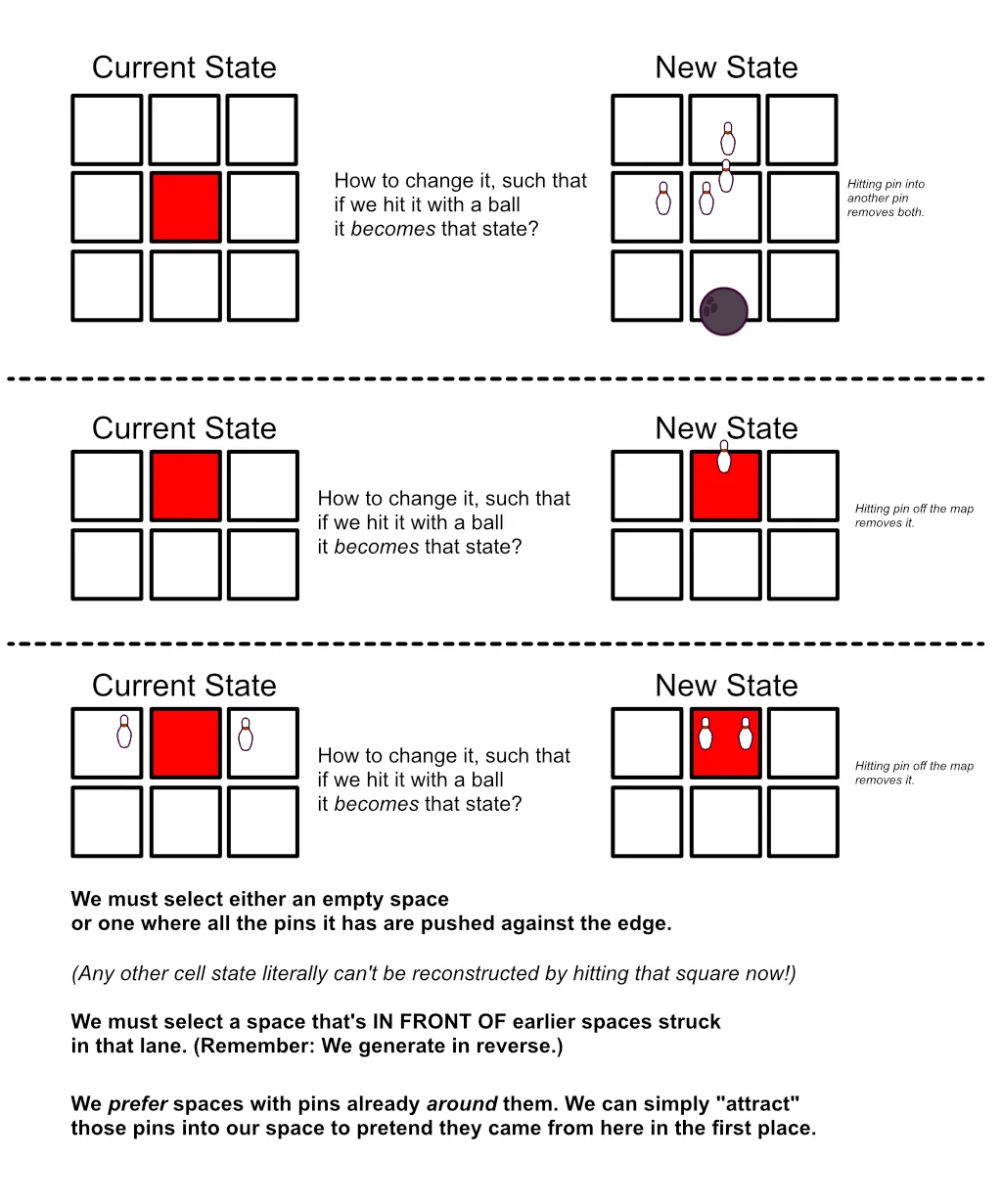
When done,
- The map now has a bunch of pins everywhere.
- The random lanes we chose (in reverse) are the solution to the puzzle!
It took about 1.5 hour to figure out this algorithm, start the project, and code the whole thing. To my surprise, it worked first try!
It worked … but it wasn’t a good puzzle.
The Problem
Here we see, once again, how our brains can’t fully think through anything and we just need to make/experience it in practice. This puzzle idea has an obvious core issue that I never considered, but which was obvious the first time I played one of my randomly generated puzzles.
If scattered pins end up on the opposite side … then pins can only ever flip flop between positions! They can’t “travel” over the board.
Say I hit a cell with a pin on the left. It scatters to the left neighbor, placing the pin on the right.
Well, if I were to hit that new cell at some later point … the pin would just scatter back to its original position.
The “attract” option for growth—as shown in that sketch above—never ever actually triggers.
And so, all the puzzles generated were pretty obvious and meh.
How do we solve this? I went to bed asking myself this question, then woke up with a few possible things to try.
IDEA 1: Maybe we can throw bowling balls from any side (instead of just vertically, front to back, within its lane). But no, this is a bad idea. It destroys the clear and intuitive bowling theme, while not really solving the problem. Changing the direction of the ball does not change how pins scatter, only which ones are hit first.
IDEA 2: Change the scattering rule to a “tile refresh”. That is, if a pin lands on a new tile, it rearranges all its pins. It starts at the top and simply places the pins it has (which is one more than before) in a clockwise order. Similar to how bowling pins are put back upright in bowling when you’re done with an attempt!
But no, it’s a nice idea but for a different game, it’s too convoluted for this one. Now kids would also need to learn this rule, understand clockwise order, and actually be able to count from the start to predict where pins will end up. It also does not solve our problem well, because the arrangement would be the same every time, so there’d still be a lot of pins ending up in similar positions and going back-and-forth.
IDEA 3: Squares have predetermined “pin spots”. Just gray circles indicating the places where pins can be. This is a nice way to differentiate cells/lanes, while clearly communicating where pins will end up/can be all the time. (Some cells can only have pins on LEFT and RIGHT, some only LEFT and DOWN, etc.) A pin is “removed” if you scatter it to a place where it can’t be (there’s no spot for it); OR, perhaps better, the pin snaps to the first position it can be.
But no, this is a somewhat interesting idea (perhaps for harder difficulty), but too convoluted and not a good enough fix for the core of the puzzle. Showing possible pin spots should really only be done on a few cells (all of them is too overwhelming). But then it’s just some extra layer of challenge on top, not something that applies to the whole game, so it doesn’t solve the problem.
IDEA 4: Simply keep the pin’s position (on the tile) the same. That is, if you scatter a LEFT pin … it will also end up on the LEFT on the new tile! (Instead of on the RIGHT—the matching opposite side.)
This is promising!
- Pins can now travel longer distances (e.g. go LEFT multiple times)
- All roads lead to the edge of the map (pins can’t go left-right-left-right, they’ll all be headed off the map by default)
- It needs minimal code changes. (When “growing”, we simply place the double pin on the other side, the opposite of what we did before.)
It really only took 5 minutes to make this change. (Instead of doing get_dir_opposite_to(old_dir) in a few places, it was now just dir :p)
And it worked! Now several pins actually travel around the map before you can finally remove them with one nice strike. Because we sort possible moves based on the number of pins around them (again, see image), we can control “how much traveling” we want there to be. (More = more fun = more challenging too.) If we pick our move more from the back of that list (“loads of pins around us!”), there’s a higher chance it can perform an “attract” move during generation.
It took 10 more minutes to write “commands” for scattering and removing pins following these rules. When you click a lane, it simply issues a CommandScatter to all pins there. This type of system—doing everything through simple commands—is what gives my puzzle games undo and hint features for free. (Because each command defines how to DO the thing, but also how to UNDO it.)
Now we have a working puzzle game. An ugly one with squares and mediocre puzzles for now, but it works
A Stupid Bug
I’m going to explain something a bit technical to help you understand a really silly, stupid mistake in the code that got me stuck for at least 30 minutes. You can skip this if you want.
Okay, so, I noticed that half the time the puzzles were wrong. That is, after doing all the right moves, and passing all the checks … there were still a few pins on the map!?
So I experimented. I debugged. I refreshed the game to get a new puzzle and check when/how it happened in this one. I was about to go insane from not being able to find the mistake when all my code was yelling how correct is.
Until I noticed a pattern: the pins that remain are always on the RIGHT side of a square
Once I saw that, the path to solving the issue finally became clear. I noticed that, indeed, the pins that remain were always shoved to the right before never being removed.
Okay, so how are directions defined? It’s an enum, which just means that I can use names like Direction.LEFT and Direction.RIGHT throughout my code to make it very readable and consistent. It also means that, behind the scenes, each of those names is just a number. Enums are a tool for programmers, for giving things nice names, but behind the scenes the different values are just integers 0,1,2,3,etc.
The first direction is Direction.RIGHT. It’s a 0 behind the scenes.
I have enough experience programming to immediately make specific alarm balls go off ;)
You see, in my code to apply a command, I check if our cell and direction are set. Because if not, then we throw an error and do nothing, otherwise the game would crash. (It can’t move a pin on a cell or direction that does not exist!)
But … enums can’t be “nothing” or “not set”. They default to the first option (0).
But in other contexts, 0 is obviously treated as “nothing” (or, rather, false).
So now we have a single value that can mean two different things in different contexts, and you can see how this leads to some really weird mysterious bug somewhere.
In my command code, I had a check like: if cell and direction: do_the_thing!
The statement if cell and direction always resulted in false when the direction was Direction.RIGHT. Because then it basically says if cell and 0 -> if cell and false -> false. (An and means all the things must be true. An or means only one has to be.)
I could’ve add a Direction.NONE value to take the 0 spot (on that enum), making Direction.RIGHT a 1. But an easier fix was just to NOT check if direction is set, because it’s an enum and thus always set to something, and that was just a dumb bit of code by me.
Anyway, moving on.
Harder Difficulties
The Easiest difficulty only has orthogonal directions (no diagonals). I also ended up turning off the rule that “pins remove each other if they want to be in the same spot”. Even though puzzles are now very simple and obvious, it feels like that rule would be one too many when starting this puzzle.
To turn this rule off, I just don’t allow that growth option (of placing two pins that will remove each other). The generator will now simply never do that, so it’s never part of the solution.
Later difficulties finally add the numbered balls. Like before, I want to keep things absolutely as simple as possible, so this mechanic is introduced in two separate stages.
- PART 1: Hit a square with exactly as many pins as the ball number to remove all.
- PART 2: If a ball has a number lower than the pin count on a square, it’s too weak and does nothing.
That second rule needs no changes to the generation. (Because we generate in reverse, every move must be a move, so a “do nothing” move just isn’t relevant in any way.)
The first rule requires a fourth “growth option”. Namely,
- With some probability, we decide “this turn should be a perfect hit”.
- If so, the ball number is equal to the pin count.
- If not, then we must purposely make the ball number different than the pin count. Otherwise we accidentally create a perfect hit and ruin our generation.
- In that case, I make the number
#pins+ a random integer between 1 and 3. The number is higher, so the move is valid.
- In that case, I make the number
- If so, place random pins, as many as we want. They’ll just be removed anyway upon hitting them.
Making It Look Good
One of the reasons I wanted to make this idea (instead of simpler ones from earlier topics in the curriculum), is because it provided a challenge in how to visualize the puzzle. How to clearly show these pins scattering away in the right direction, and being removed in certain cases? I hoped to learn a few more tricks from figuring this out.
And I did :)
Why is it so tricky?
- When you click a lane, first a ball should start rolling.
- That ball should stop at the first square with pins.
- Only then should the pins scatter away: play an animation moving them in the right direction
- And only then, once a pin has moved, should the data behind the scenes be updated to reflect this.
- (If updated earlier then, for example, the pin on the neighbor cell will already be removed before the pin we hit even started moving towards it. It would simply mean that some things happen too early and it’s weird, so we need to wait for it.)
There are three main tricks that I found that made my final code or this system relatively simple.
Trick #1
Trick 1: We don’t actually move the pin that was hit. Instead, we make a fake copy and move that instead.
Every cell has 9 pins inside it (one at each position). It simply hides/shows the right ones depending on its state. But those pins never leave their position—never leave their cell. That seems doable at first but quickly leads to all sorts of issues (both visually and with the logic).
So, instead, I create a new pin (at the same position, same size, etcetera). And I play a Tween to move that fake pin from the original position to the new one. Now I can await that_tween.finished, and the code below that point only runs once the movement is done. In this case, it finally adds the pin to the data of the new cell. (It is now “officially” part of that next cell, which means it will display it, and I can remove the fake one.)
In fact, I decided to animate one pin at a time. It’s much clearer what happens (for the player) and prevents it being overwhelming when you hit a square with 3(+) pins flying away. That means I only need one “fake pin” that I just keep around and re-use for every movement.
This one-at-a-time method also allows playing audio saying the name of the direction, e.g. “LEFT!”, to reinforce that too and increase educational value. If we don’t do this, well, it would say LEFT! RIGHT! UP! all at the same time and it would sound like a mess :p
Trick #2
At first, I also added a little “appear” and “disappear” animation to the pins. It just looks a lot nicer if things pop in and out of the game as opposed to them suddenly being gone (or appearing where they were not before!).
Cells can simply check if they received any new pin, or if any has been removed, and play the animation accordingly each time.
But … this doesn’t work with the system above. It would mean that …
- When the scattering starts, the real pin (in the cell) is still visible as it’s doing its disappear animation (takes ~0.2 seconds)
- When the scattering ends, the fake pin arrives at the right location, destroys itself … and we see nothing! Because it still takes ~0.2 seconds for the new pin (inside the new cell) to play its appear animation.
To sell the illusion that we’re moving that specific pin, it just has to be gone in an instant (replaced by the fake one). It looks confusing any other way.
Okay, but what about every other situation in which a pin is added/removed? What about undoing? If we play the scatter animation in reverse, then undoing takes reaally long. And pins pop into existence without animation!
So …
Trick 2: I seperated the visual effects for the DO and UNDO of commands. The DO is always a scatter of a pin, and it uses Trick #1 to sell the idea. The UNDO happens instantly behind the scenes, but all the pins that come back on the field play their little appear animation.
This makes both actions look good. The UNDO is fast now, without instantly popping pins into existence but instead animating them.
Trick #3
One main issue with puzzles like this is that you basically have two modes: generating and playing. Ideally you want both to use the exact same code (the same commands). But …
- When generating, things should happen instantly.
- When playing, things should be animated and wait for other things to complete (as explained above).
How do we draw this distinction? How can we easily access the visual part of the game if we need it, but not require it?
In my command system, there’s only a single parameter passed into every do() and undo() function: the commands manager. The thing remembering the history, able to undo the last turn, etcetera.
I decided to add a built-in variable (visualizer) to this manager that holds a reference to the game world.
Now, every command can use manager.visualizer to find the game objects connected to the puzzle data. If it exists, we can do simple calls like manager.visualizer.play_scatter_tween(cell, direction). When generating instead of playing, that reference simply does not exist and the command skips those bits.
The await keyword is vital here. It allows waiting for something to complete before continuing with the rest of the code.
- When generating, we don’t use any of that. Things happen instantly. Commands have no visual side effects.
- When playing, we
awaitthe animations the visualizer creates for us.
But what if a player already wants to do the next turn while animations are still happening? What if they click a new lane while the old one is still doing stuff?
In many puzzle games, I simply forbid this.
- When you do a new move, the commands manager sets
busytotrue… and only sets it tofalseagain once everything is done and handled. - Now I can check
commands.is_busy() - And if true, then we simply ignore the user input. (Optionally: tell them they can’t move again yet.)
With such strict visualization like in this game, it’s just too convoluted to try and allow players to move instantly. You’d have to somehow force an “instant finish” of all scattering and animating left to do.
All I can do is make the animations fast. You never have to wait more than a few seconds before being able to take your next turn. (And, as stated, the UNDO is instant, to soften the issue even more.)
In simpler puzzle games (at least visually) I usually do allow this. My first puzzle games (like Dwarfs & Giants and Colorcross) used this technique:
- When you do something, the logic / data change for it always happens instantly. (Moving something? Behind the scenes it has teleported, instantly there.)
- The animation that plays is just for show—nothing awaits it, nothing depends on it. (Moving something? Play an animation to make it get there at some point. It doesn’t matter if you already do your next move while it’s busy.)
- In such cases it is fine if you click while an animation is still busy, because the data was already up-to-date behind the scenes and so nothing will go wrong.
Anything Else?
As usual, “finishing” or “polishing” the game took twice as long as coding the entire logic/algorithm. But there’s nothing interesting to say about that. It’s about adding basic sound effects, a few images for pins/ball, some minor animations and particles just for show, and some “quality of life” features/settings to tweak. (Such as turning off the audio of the direction in case you’re annoyed by it or don’t need it.)
I always envisioned this game as a pure black-and-white, really minimalist, bowling puzzle. This obviously cuts down the time spend on the visuals, as well as the likelihood of doing something unique that’s worth talking about.
Conclusion
And that’s it!
As usual, it’s not some ground-breaking puzzle game you want to play forever. But it’s a good puzzle game with five nicely scaling difficulty levels. It has a very unique theme, look, and core mechanic. And it’s tightly focused on the few educational topics it wants to breach, partially thanks to its more minimalist look.
(This also marks it as the first puzzle game to be both Level 1 and Level 2. Directions is level 1; Numbers is level 2. But I obviously hope to have many more puzzles of that kind soon, so this isn’t that special.)
The harder difficulties provide a nice puzzle for adults or older kids too. There could be more (visual) variety to the game, but I didn’t find a way to add this without overcomplicating the good core that we have.
For example,
- We might create colored pins, which can only be hit by balls of the same color.
- We might create different types of pins. Some that can only be removed at the edge, some that move in reverse direction, etcetera.
Sure, this would work fine, but it requires a lot of extra explanation. Extra difficulty levels, or maybe settings that completely transform the game. Before long you’re forcing three different games into one game, and it just doesn’t feel right.
I wrote down all further improvements and ideas in a list for “Pinstrike: Deluxe” or something. Maybe they’ll be made, or added to this base game, maybe not.
Until next devlog,
Pandaqi